Case Converter
Use our Case Converter to instantly change text into UPPERCASE, lowercase, Title Case, Sentence case, or Toggle case. This free online tool is built for writers, students, developers, and professionals who need quick and accurate text formatting in just seconds.
Input Text
Custom Capitalization
Converted Text
What is a Case Converter?
A Case Converter is an online tool that automatically changes the capitalization of your text. Instead of editing each word manually, you can paste your text, choose the format, and get perfectly formatted output instantly.
This tool is especially useful for content creators, programmers, students, and office professionals who regularly need consistent text formatting. It saves time and reduces human error compared to manual editing.
How to Use the Case Converter
- Paste or type your text into the input box.
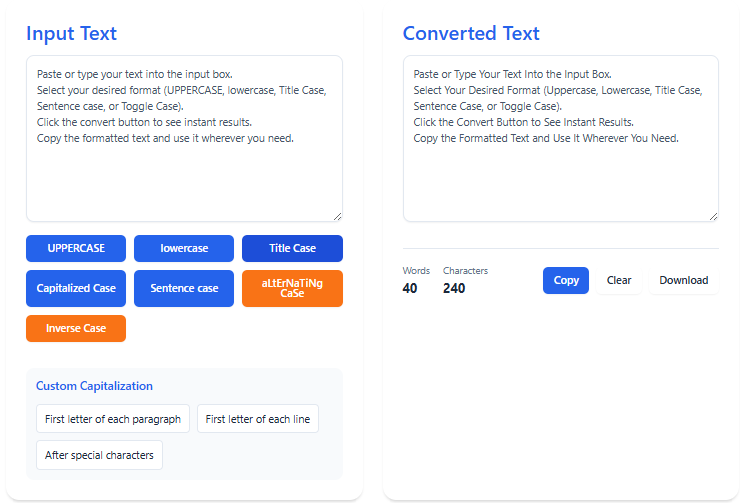
- Select your desired format (UPPERCASE, lowercase, Title Case, Sentence case, or Toggle Case).
- Click the convert button to see instant results.
- Copy the formatted text and use it wherever you need.
- Paste or type your text into the input box.
- Select your desired format (UPPERCASE, lowercase, Title Case, Sentence case, or Toggle Case).
- Click the convert button to see instant results.
- Copy the formatted text and use it wherever you need.
Available Case Formats
- UPPERCASE: Converts all letters into capital letters.
- lowercase: Converts all letters into small letters.
- Title Case: Capitalizes the first letter of every major word.
- Sentence case: Capitalizes only the first letter of each sentence.
- Toggle Case: Switches each letter’s case from upper to lower or lower to upper.
- snake_case & kebab-case: Perfect for programmers and file naming.
Why Use This Case Converter?
Manually changing capitalization is time-consuming and prone to mistakes. This tool provides:
- Speed: Convert text instantly with one click.
- Accuracy: Get consistent formatting every time.
- Privacy: All conversions happen in your browser. Your data is never saved.
- Flexibility: Works on any device – desktop, tablet, or mobile.
- Free Forever: No signup, no hidden charges, no limits.
Common Use Cases
The Case Converter is helpful for many purposes, including:
- Formatting blog titles and article headlines.
- Writing professional email subject lines.
- Cleaning up text copied from documents or PDFs.
- Preparing variables and file names for programming.
- Editing academic papers, essays, and reports.
Frequently Asked Questions (FAQ)
Is the Case Converter free?
Yes, our Case Converter Tool is 100% free to use and always available online.
Can I convert long text?
Yes, you can paste long paragraphs, full documents, or even pages of text into the tool.
Will my data be saved?
No, all conversions happen locally on your device. We do not store or share your text.
Can I use it on mobile?
Yes, the tool is mobile-friendly and works smoothly on smartphones and tablets.
Related Free Tools
We also offer other useful online tools:
Final Thoughts
For more details on text transformation rules, you can also check Wikipedia’s guide on Letter Case.